
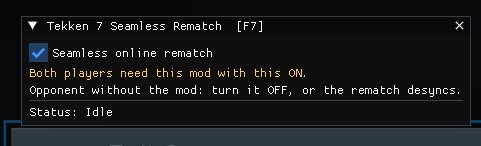
Online rematches in Tekken 7 normally tear the whole match down. The game unloads the stage and characters, shows the VS screen, loads everything again and plays the full character intros. That takes about 45 seconds.
This mod makes an online rematch work the way an offline VS rematch does. The stage and characters stay loaded, the battle resets in place, and you go straight into the fight once both games are connected. In testing, Accept → "Ready, Fight" went from ~45 s down to ~24–27 s. The remaining time is the game's own online handshake ("Connecting…") and ping measurement, which the mod keeps so both players stay in sync.
Installation
Download dinput8.dll. Open your Tekken 7 folder and go to TEKKEN 7\TekkenGame\Binaries\Win64. Steam: right-click Tekken 7 → Manage → Browse local files. Copy dinput8.dll into that folder, next to TekkenGame-Win64-Shipping.exe. If another mod already uses a dinput8.dll there, back it up first. Only one can be installed at a time. Start the game. A small message in the top-left corner shows the mod status for the first 10 seconds. Press F7, tick "Seamless online rematch", then press F7 again to close the menu. The setting is saved. Make sure your opponent has done the same, then play a Player Match and pick Rematch.
Known issues
"Connecting…" still takes ~15–20 s. That is the game's own lobby handshake and ping measurement, which the mod keeps for sync.