
🎮 Tekken 7 Voice Editor v1.0.6
Developed by psCobraSS
The ultimate voice editing tool for Tekken 7 PC — Replace, customize, preview, and create character voice mods without Wwise!
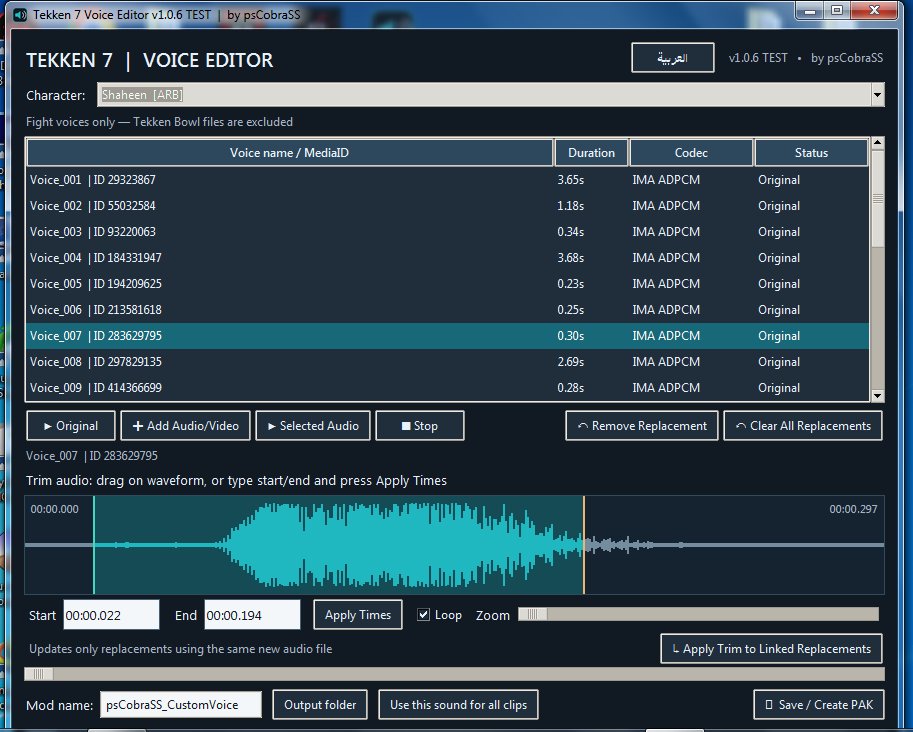
Tekken 7 Voice Editor by psCobraSS is a lightweight, user-friendly Windows application designed to simplify character voice modding in Tekken 7.
The program allows you to browse original character voices, listen to individual sound clips, replace them with custom audio, extract sound from videos, trim audio with millisecond precision, and generate ready-to-use PAK mods.
All essential editing features are available in one convenient interface, eliminating the need to manually use Wwise or Unreal Engine for supported voice banks.
🎮 1. Original Tekken 7 Character Voice Library
The application includes a collection of original Tekken 7 character voice banks, including DLC characters.
Features: - Select characters from an easy-to-use dropdown menu. - Browse the original voice clips of the selected character. - View voice names, IDs, and available audio information. - Automatically load character voices after selecting a character. - Listen to fighting voice clips before making changes. - Support for attacks, damage reactions, special moves, Rage Arts, knockouts, and other character-related sounds.
The application focuses on character voices used during fighting matches.
Ultimate Tekken Bowl audio is excluded.
🔊 2. Listen to Original Character Voices
Before replacing any sound, you can preview the original audio directly inside the program.
Features: - Play individual original voice clips. - Double-click any voice to play it. - Stop playback at any time. - View the audio waveform. - Watch the playback cursor move across the waveform. - Select and preview specific sections of original audio. - Enable Loop to repeat a selected section.
Trimming an original voice for preview does not modify its original audio data or the final PAK.
When switching to another original voice and returning, the previous preview selection is automatically cleared.
🎵 3. Replace Character Voices
Replace character voice clips with your own custom audio files.
Supported input formats: - MP3 - WAV - WEM - MP4 video - MKV video - MOV video
When importing a video, the program automatically extracts its audio for editing.
You can replace a single voice clip, multiple clips, or all supported voice clips of a character.
Example:
If Geese Howard has 73 original voice clips, you can replace only five of them while keeping the remaining 68 unchanged.
You can also assign a single custom audio file to multiple supported clips.
✂️ 4. Built-in Precision Audio Trimmer
The application features an integrated audio editor that allows you to select exactly which part of an audio or video file will be used.
Features: - Interactive waveform display. - Free selection using your mouse. - Adjustable start and end points. - Waveform zoom for precise editing. - Millisecond-precision timestamps. - Manual start and end time entry. - Apply Time button to confirm selections. - Preview only the selected section. - Easily change or remove a selection.
Example:
Start: 00:05.250
End: 00:08.750
Selected duration: 3.500 seconds
The selection will be applied only after pressing Apply Time, allowing you to edit timestamps freely.
🔁 5. Loop Playback
Listen to any selected audio section repeatedly while editing.
Features: - Play the selected section only. - Automatically repeat the selection. - Stop playback instantly. - Adjust the selection and preview it again. - Use Loop with original or replacement audio.
Loop is intended for preview purposes only. Enabling it does not automatically make the sound repeat inside Tekken 7.
⏱️ 6. Custom Audio Duration Support
Replacement audio does not need to match the duration or file size of the original sound.
For example, you can replace a 0.2-second sound with a 6-second or 21-second audio clip.
The program rebuilds supported Wwise sound banks and updates the necessary audio data references.
Successfully tested in Tekken 7 PC:
A short Geese Howard voice was replaced with a custom audio clip lasting approximately 21.6 seconds, and the entire replacement played successfully during gameplay without using Wwise.
Playback behavior may vary depending on the character, sound event, and bank format.
🎧 7. Preview Replacement Audio Before Saving
You can listen to your custom audio before generating a PAK file.
Features: - Preview the entire replacement audio. - Preview only a trimmed section. - Compare original and replacement sounds. - Edit selections before saving. - Change replacement files at any time.
If you do not trim the replacement audio, the program uses the entire audio clip.
If you apply a trim selection, only the selected section is used for replacement.
🔄 8. Batch Voice Replacement
The application supports multiple voice replacements in a single editing session.
Features: - Replace individual clips. - Replace multiple clips. - Apply one custom audio file to all supported clips. - Apply the same trim selection to all replacements linked to that source file. - Cancel individual replacements. - Remove all pending replacements with one action.
Example:
If several voice clips use the same custom MP3 file, you can trim the file from 5 to 10 seconds and select Apply Trim to All Linked Voices.
Every linked replacement will use the updated five-second selection, while unrelated replacements remain unchanged.
📦 9. Automatic PAK Mod Creation
Once you finish editing, click Save & Create PAK.
The program processes the replacement audio, rebuilds supported BNK files, and generates a Tekken 7 PAK mod.
Features: - No need to manually run Wwise. - No need to manually run Unreal Engine. - Automatic PAK generation. - Preserves original voice clips that were not replaced. - Maintains essential voice identifiers and references. - Creates a mod ready for testing in Tekken 7 PC.
Installation:
Copy the generated PAK file to:
TekkenGame\Content\Paks\~mods
Launch Tekken 7 and test the modified character.
🌐 10. Arabic and English Interface
The application supports two interface languages:
- Arabic
- English
You can switch languages directly from the application without restarting.
The compact interface is designed to make voice editing accessible without requiring advanced knowledge of audio modding tools.
💻 11. Standalone Windows EXE
The application can be packaged as a single Windows executable containing the required audio-processing components and voice library.
The standalone build is designed to eliminate the need for separate installations of Python, FFmpeg, or Wwise on the receiving computer.
Successful standalone operation depends on including all required components during the build process and testing compatibility with the target Windows version.
🥊 12. Fighting Voices Only
The application is specifically focused on character audio used during Tekken 7 battles, including:
- Attack voices
- Damage reactions
- Special move voices
- Rage Art sounds
- Knockout sounds
- Other character fighting voice clips
Voice changes may also apply to Story Mode battles when those battles use the same audio clips.
Ultimate Tekken Bowl audio and separate cinematic dialogue editing are not included.
🧪 13. Successfully Tested Features
The voice replacement workflow has been tested in Tekken 7 PC.
Confirmed results:
✅ Replaced a Geese Howard voice with a Jin Kazama voice.
✅ Clear replacement audio during actual gameplay.
✅ Successfully generated a working PAK without Wwise.
✅ Replaced a short voice with a six-second audio clip.
✅ Replaced a short voice with an approximately 21.6-second audio clip.
✅ Confirmed full playback of the 21.6-second replacement during gameplay.
✅ Successfully loaded character voice libraries and previewed original voices within the application.
Compatibility note: Some sound banks use special structures or audio codecs that may require additional support. Not every voice clip across every character has been verified in-game.
📋 Program Information
Program Name: Tekken 7 Voice Editor
Version: 1.0.6
Developer: psCobraSS
Platform: Windows PC
Supported Game: Tekken 7 PC
Interface Languages: English / Arabic
Audio Input: MP3, WAV, WEM
Video Input: MP4, MKV, MOV
Output: Tekken 7 PAK Mod
Wwise: Not required for supported voice editing and PAK creation workflows
⭐ Final Overview
Tekken 7 Voice Editor by psCobraSS brings character voice modding tools together in one lightweight application.
Select a character, browse its original voices, listen to any clip, import your own audio or video, trim the exact section you want, preview the result, and generate a custom PAK mod.
Whether you want to replace a single attack sound, customize special move voices, or create a complete character voice replacement, the program is designed to make the process faster and easier.
Developed by psCobraSS
Make your Tekken 7 characters sound the way you want!