
T8 Matchmaking Filters
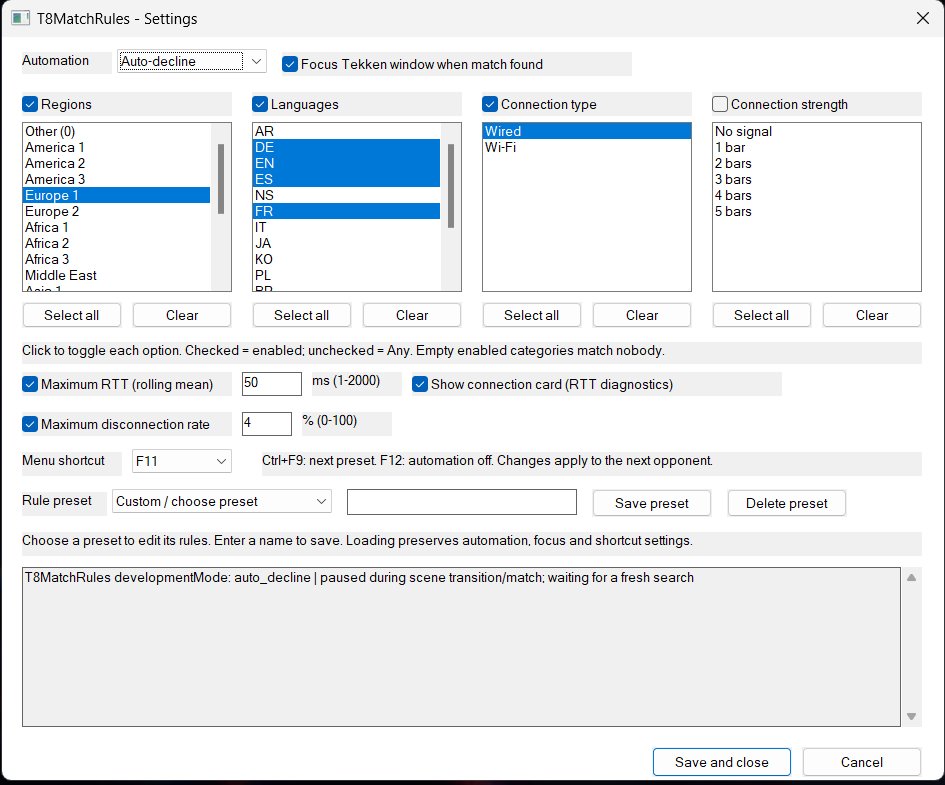
Configure matchmaking filters to choose specific region, language, wired/Wi-Fi, connection strength, and auto-accept/decline opponents.
Modes
- Auto-decline declines opponents for you silently, even while Tekken is in the background. Any opponents that pass your filters keep the match found "ding" and (optionally) focus the Tekken window for you to review the match and click yes/no yourself.
- Auto-Everything is the same as auto-decline, except it also automatically accepts any matches that pass your filters.
Menu Options & Filters
Press F11 to open the menu and enable any of the filters and select the values you want to allow.
- Region only allows opponents matching the specified regions, e.g Europe 1, Europe 2, America 1, etc.
- Language only allows opponents matching the specified language, e.g EN, FR, DE, ES, etc.
- Connection Type only allows opponents matching the specific type of connection, e.g wired or wifi.
- Connection Strength only allows opponents matching the in-game connection strength bars displayed when a match is found, e.g 5 bars, 4 bars, etc.
- Maximum disconnection rate limits opponents via their disconnection rate percentage, inclusively from 0 to 100%.
- Maximum RTT (rolling mean) limits opponents via their mean RTT to your chosen value, inclusively from 1 to 2000 ms.
- Show connection card displays mean RTT in the prompt and full range, spread and sample count in F11. The RTT filter works even with the card hidden.
- All enabled filters must pass. Any selected value within a filter is allowed. Unchecked filters allow anything; an enabled empty filter allows nobody.
- Focus switches you to the Tekken window when an opponent that passes your filters is found. This can be used with both auto-modes.
- Automation pauses once a match starts and resumes on the next search. An opponent declining does not switch it off. Your saved mode is preserved.
- F12 turns automation Off while Tekken or its settings window has focus.
Rule presets
Choose a preset to load its rules into the menu draft, then Save and close to apply them to the next opponent. Enter a name and click Save preset to store the current draft; up to 16 named presets are supported. Saving a preset writes it immediately; Cancel leaves active rules unchanged. Delete preset removes the selected snapshot.
With Tekken focused and settings closed, Ctrl+F9 cycles saved presets. Presets retain filter selections, percentage/RTT limits and card visibility, while preserving the current automation mode, autofocus and menu shortcut. Loading a preset does not undo F12.
Install UE4SS V3.0.1 (skip if already installed)
- In Steam, right-click TEKKEN 8 → Manage → Browse local files, then open
Polaris/Binaries/Win64. - Download
UE4SS v3.0.1 (
UE4SS_v3.0.1.zip) and extract it into Win64, besidePolaris-Win64-Shipping.exe. - Only if UE4SS crashes on startup: try setting
bUseUObjectArrayCache = falseinUE4SS-settings.ini, as suggested by the UE4SS release notes.
Install T8MatchRules
- Close the game and extract the mod ZIP.
- Copy the included
Polarisfolder into your TEKKEN 8 game folder, merging folders. - Check that
Polaris/Binaries/Win64/Mods/T8MatchRulescontainsenabled.txt,Scripts/main.luaanddlls/main.dll. - Launch the game and press F11 to open the menu.
If updating, back up the old T8MatchRules folder outside Mods, install the new copy, then restore profile.ini and any preset-1.ini through preset-16.ini files to keep your settings and presets.
Uninstall: close the game and move Mods/T8MatchRules out of Mods.
Compatibility: Windows x64, Steam build 26651490, UE4SS 3.0.1 and the Microsoft Visual C++ x64 runtime. This is a beta; other builds/loaders are not verified.