
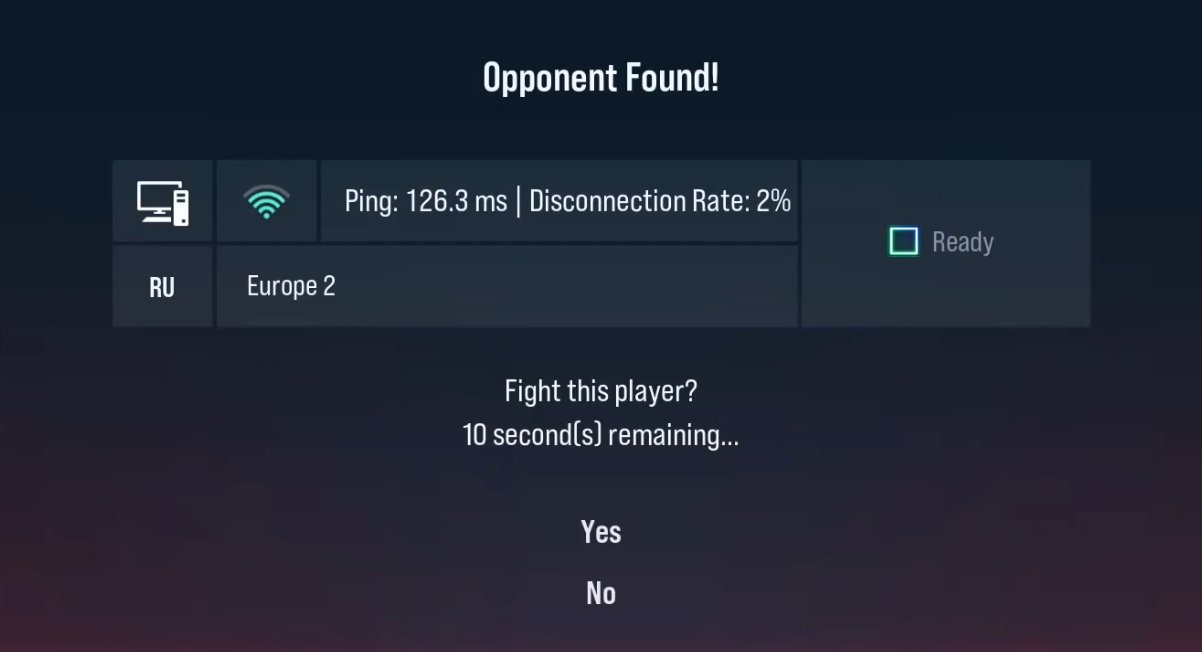
TekkenRTTDisplay
Current version: 1.1.3 (tekken8 3.02.02)
Shows your real pre-battle ping (RTT, in milliseconds) on the matchmaking accept dialog, instead of only the bucketed antenna-bar quality indicator. The number is read directly from the game's own RTT statistics manager, before you ever accept or decline.
Requires UE4SS (a scripting/modding
framework for Unreal Engine games). If you've never installed UE4SS before,
follow Part 1 below first. If you already have UE4SS working for Tekken
8, skip straight to Part 2.
Part 1: Installing UE4SS (skip if you already have it)
UE4SS is not made by this mod's author -- it's a separate, widely-used open-source modding framework that many Tekken 8 mods depend on, similar to how many Skyrim mods require SKSE.
Find your Tekken 8 install folder. In Steam, go to your Library, right-click TEKKEN 8 -> Manage -> Browse local files. This opens a folder that looks like:
...\steamapps\common\TEKKEN 8From there, open the subfolder:
Polaris\Binaries\Win64You should see
Polaris-Win64-Shipping.exein this folder. This exact folder (Win64) is where everything in this guide gets placed -- not the top-levelTEKKEN 8folder.Download UE4SS. Go to the UE4SS releases page and find the v3.0.1 release: https://github.com/UE4SS-RE/RE-UE4SS/releases/tag/v3.0.1 or https://tekkenmods.com/mod/3761/ue4ss-v3-0-1-for-tekken-8
Under "Assets", download
UE4SS_v3.0.1.zip.(This mod was built and tested against exactly this version. A newer UE4SS version may or may not still work -- see "Known limitations" below. If in doubt, use this exact version.)
Extract it into the Win64 folder. Open the zip and extract all of its contents directly into the
Win64folder from step 1 -- so thatUE4SS.dll,dwmapi.dll,UE4SS-settings.ini, and a newModsfolder all end up sitting right next toPolaris-Win64-Shipping.exe, not inside a subfolder.Launch the game once to confirm UE4SS is working. Start Tekken 8 normally through Steam. Then close it again, go back to the
Win64folder, and check for a new file calledUE4SS.log. If it exists and has content, UE4SS is working. If you don't see it at all, see Troubleshooting below before continuing.(Optional) Turn off the other mods UE4SS bundles by default. The stock UE4SS download comes with several utility/debug mods already present in
Mods\(console access, a cheat manager, etc.), some enabled out of the box. If you only want this ping display and nothing else, openWin64\Mods\mods.txtin a text editor and change every: 1to: 0(or just delete those mod folders fromMods\entirely). This mod doesn't depend on any of them.
Part 2: Installing TekkenRTTDisplay
- Download
TekkenRTTDisplay-release.zipfrom this repo and extract it somewhere on your PC. - In the
Win64folder from Part 1, open theModsfolder (UE4SS created this for you). Copy the entire
TekkenRTTDisplayfolder (from the zip you just extracted) intoMods, so you end up with:Win64\Mods\TekkenRTTDisplay\enabled.txtWin64\Mods\TekkenRTTDisplay\Scripts\main.luaWin64\Mods\TekkenRTTDisplay\dlls\main.dll(A common mistake: some zip tools create an extra nested folder. Make sure
enabled.txtis directly insideTekkenRTTDisplay, not insideTekkenRTTDisplay\TekkenRTTDisplay.)- Launch the game. No further setup, no editing any config files.
- To verify it loaded: check
UE4SS.logfor a line likeMod 'TekkenRTTDisplay' has enabled.txt, starting mod. - Go into matchmaking (Ranked or Quick Match). Once an opponent is found
and the accept dialog appears, the connection-rate label should now
read something like
Ping: 67 ms | Disconnection Rate: 0%.
Uninstalling
Delete the Mods\TekkenRTTDisplay folder. That's it -- nothing else on
your system is touched. (To also remove UE4SS entirely, delete
UE4SS.dll, dwmapi.dll, UE4SS-settings.ini, UE4SS.log, and the
Mods folder from Win64.)
Troubleshooting
Small frame hitch (one dropped frame every few seconds) while online. This was a bug in 1.1.2 only -- fixed in 1.1.3, so make sure you're on the latest version.
No
UE4SS.logever appears. UE4SS isn't loading. Double check the files from Part 1 were extracted intoWin64(the folder containingPolaris-Win64-Shipping.exe), not the top-levelTEKKEN 8folder.- Antivirus deleted or quarantined
dwmapi.dll. This is a known false positive -- the technique UE4SS uses to load itself (replacing a system DLL with a proxy that forwards to the real one) resembles something malware also does, even though this is legitimate open-source software. Restore it from quarantine, or add an exclusion for theWin64folder in your antivirus settings. UE4SS.loglooks fine but there's noTekkenRTTDisplayline in it. Re-check the folder structure from Part 2, step 2.- Mod loads (per the log) but no ping ever shows. The memory offsets this mod uses are specific to the exact game build they were found on -- see "Known limitations" below. This has already happened a couple of times (see Changelog 1.1.0 / 1.1.1) and may happen again after future game patches.
- The game crashes or freezes when loading a stage or ending a match. Fixed in 1.1.2 -- make sure you're on the latest version.
Known limitations
- The memory offsets this mod uses are specific to the exact game build they were found on. If Bandai Namco patches the game, these offsets can shift. The read is wrapped in exception handling, so a broken offset should just mean the ping display falls back to the game's own text rather than crashing -- but a value that's wrong-but-plausible after a patch is a theoretical risk until offsets are re-verified.
- This is unaffiliated fan-made software, not endorsed by Bandai Namco or the UE4SS project.
Changelog
1.1.3
- Fixed a small frame hitch (one dropped frame roughly every 2-3 seconds) introduced in 1.1.2. The fallback scan for the matchmaking dialog was searching the game's entire object list on the game thread every 2 seconds; it now just re-checks the one dialog widget it already knows about, which is effectively free. The 1.1.2 crash fix is unchanged.
1.1.2
- Fixed a crash (
EXCEPTION_ACCESS_VIOLATION) and occasional freeze when loading into a stage or ending a match. UI/object calls were racing the game's own object cleanup at exactly those moments; they now run throughExecuteInGameThreadinstead, fixing the race at its source. Thanks tolrobsky for identifying the fix.
- Restored the dialog-rediscovery scan to a responsive 2s interval (was slowed to 30s in 1.0.1 purely as a stopgap against the crash above).
- Fixed a crash (
- 1.1.1
- Fixed the mod going silent again after another game patch shifted the RTT stats manager's address a second time. Re-located it the same way as 1.1.0 and updated the offset.
- 1.1.0
- Fixed the mod going silent (falling back to vanilla text, no ping shown) after a game patch changed the executable enough to move the RTT stats manager's address. Re-located the new address via a runtime memory scan rather than static analysis, and updated the offset.
- 1.0.1
- Fixed occasional garbage/negative ping values (e.g. displaying
something like
111182458.8 ms), caused by reading the game's RTT sample list without synchronization -- an unlucky read could land mid-write and return corrupted data. Now filtered out before display (any value outside a plausible 0-2000ms range is discarded rather than ever shown). - Reduced how often the mod scans for the matchmaking dialog as a fallback (from every 2s to every 30s), based on evidence from a crash report that this scan could occasionally trigger a crash if it ran during the heavy object cleanup that happens right when a match ends.
- Fixed occasional garbage/negative ping values (e.g. displaying
something like
- 1.0.0 - Initial release.
Source / how it works
Full source (including the native component) is available for anyone who
wants to verify what this does or rebuild it themselves -- see
TekkenRTTDisplay-source.zip in this repo.